

4 September 2026 · Apollo View Modular
The homepage plays acid now
The homepage is live: DeltaScope's display running in the browser on a wavetable synth playing acid lines it wrote itself. Hover to ride the filter or play it, GENERATE new lines, keep the good ones and take them away as MIDI. Free, no account.

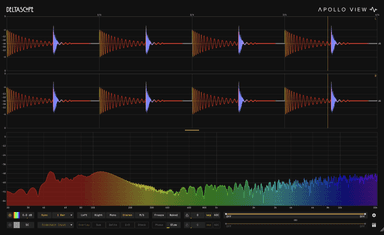
The homepage used to open on a still of a DeltaScope trace and spectrum. Now it is live: the display from DeltaScope, the analyser plugin, running in the browser on a wavetable synth playing a sixteen-step acid line it wrote itself. Nothing is a recording. If you have wondered what the plugin looks like with signal through it, that is it. It starts muted, every visit; press SOUND to hear it. The picture runs either way.
DELTASCOPE
See the difference
Play it
On a desktop, hover. The whole field, trace and spectrum, is the surface; FILTER | SYNTH in the control strip decides what the pointer does.
FILTER is the default: the line keeps playing and you ride the filter. Across is the cutoff, 30 Hz on the left to 3 kHz on the right. Up is resonance, Q 0.5 to 100, and the top screams. Park the mouse and it holds. Leave the field and it drifts back in a second or so.
SYNTH makes it an instrument. Across plays notes of the current key with a little glide, two octaves, quantised to the scale. Up is wave shape: sine at the bottom, folded and comb shapes towards the top. The line pauses while you play and returns a couple of seconds after you stop. The "i" at the end of the strip explains the rest.
The acid line
Each line is sixteen steps with accents, slides and octave jumps, drawn from a seed. GENERATE deals a new one. Tempo is 100 to 160 BPM on the ‹ › beside it; root and scale are menus. Change the root and the line moves with it, rhythm untouched. Change the scale and the notes are drawn again from the new one.
The generator is inspired by Iftah's Sting, the Max for Live device I've used for years. This is my own take on the idea.
Fuzz
The synth is a small wavetable, eight shapes, into a soft clipper ahead of a 303-style resonant filter: the fuzz is the oscillator's and the filter shapes it. The shapes are matched for loudness rather than peak, so the spikier ones hit the clipper harder. Resonance is limited inside the filter's own loop, so the bass keeps its weight however far you push it; at the top it whistles rather than thins.
The fuzz is the voice. I set the drive so the clipper is working on every note, then built the filter to keep the bass underneath it. Sound on, SYNTH, top of the field, and you'll hear it arrive.
Keep the good ones
Press the heart and the line joins your favourites. The ‹ › beside the heart step through them, and the site opens on the last one you kept. A favourite is four numbers, so it sounds the same every time. They live in your browser: no account, nothing uploaded.
Take it with you
The download arrow gives you every favourite as a zip of MIDI files, one bar each, named like 01-C-minor-128bpm.mid. Slides are overlapping notes, accents are velocity 127, plain notes 95, which is how most 303-style synths read them: set yours to legato with a little glide and it should play as the page did.
Two answers to what this is for. The fun one is a homepage you can play. The practical one is a pile of acid patterns you did not have to programme, free, in a format every DAW opens.
On a phone
The field fills the screen and the controls sit in a band between the scope and the spectrum. Touch and drag: across and up work as they do under a mouse, and the page will not scroll under your finger. Tap SOUND, thumb down, go.
For the curious
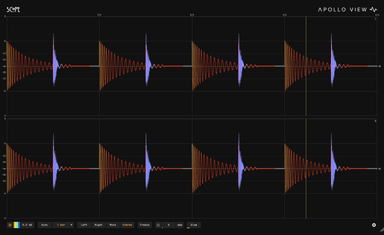
The scope and spectrum are DeltaScope's own display maths, transcribed function for function and drawn with WebGL. With sound on, the audio thread streams its actual output back and the display draws that, delayed by the output latency, so what you see is what the speakers get. If your browser cannot run it, or you asked for reduced motion, you get the still. Scope, the free plugin, draws the same trace on your own tracks.
SCOPE
See the signal
Go and play. If one of those patterns ends up in a track, I'd like to hear it. And, as ever, tell me what's missing.