Unified display
Show or hide scope, spectrum, and meters independently. Drag the divider to set the ratio.


See the difference
Scope, spectrum, and metering in a single view. Route a second signal in and see exactly what your processing changes — in time, frequency, and phase. The visual feedback you need to make confident mix decisions.
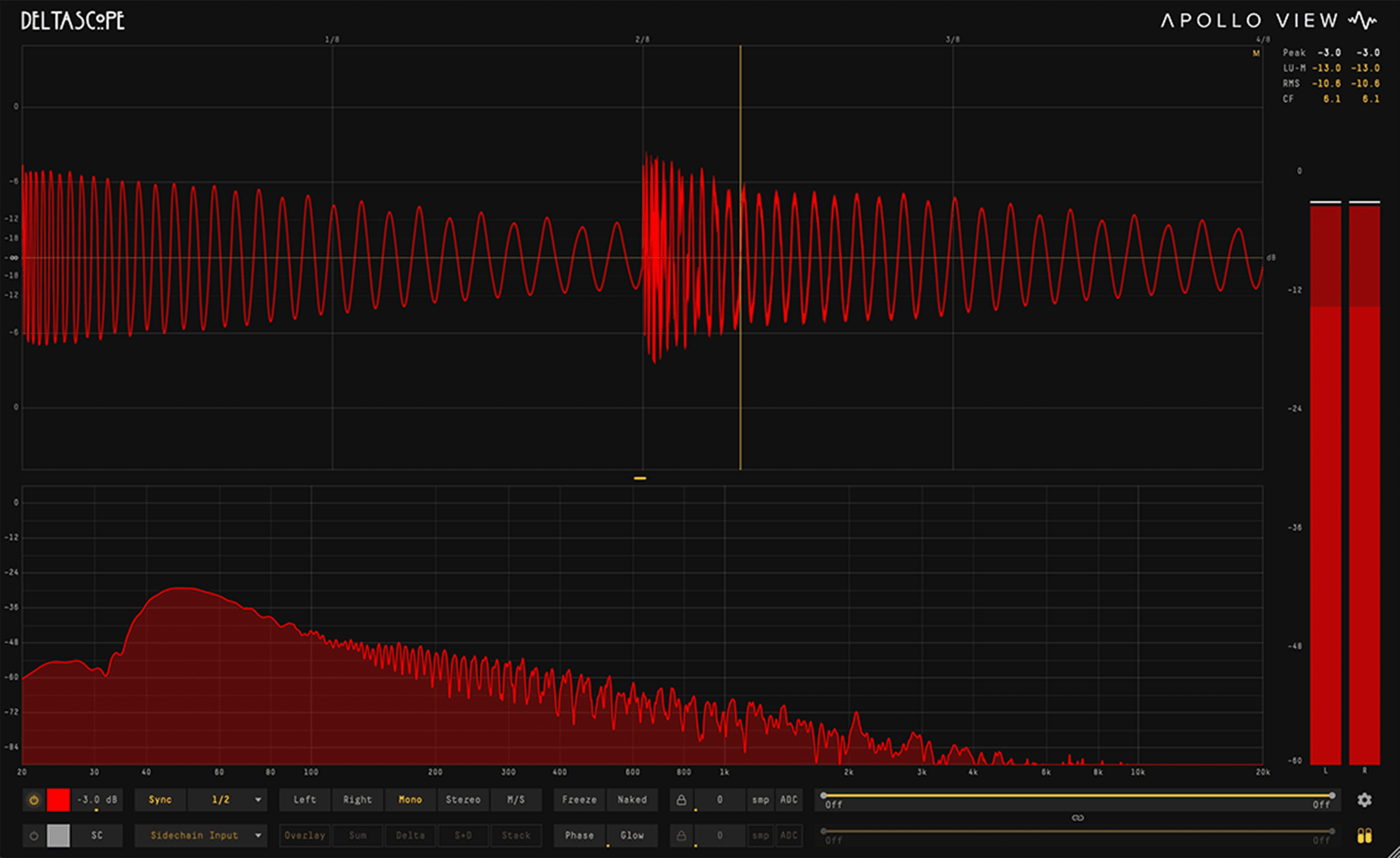
Show or hide scope, spectrum, and meters independently. Drag the divider to set the ratio.
Route a second signal via sidechain or link to another instance on any track. No bus routing required.
Frequency, amplitude, phase, and duration — read directly from the waveform. Alt+hover locks to a single cycle instantly.
Overview
DeltaScope shows you what your processing is actually doing. Compare any two signals — then switch to Delta mode to see exactly what changed. Isolate frequency bands, map phase correlation across time, and measure directly from the waveform. Zero latency. Minimal CPU.
No bus routing. No setup. Just drop it on two tracks.
Place DeltaScope on two tracks and they find each other automatically — by track name. Or route any signal via sidechain. Either way, you're comparing in seconds.
Overlay, stack, sum, delta, and sum+delta split. Show or hide each channel independently. Because the relationship between two signals is rarely captured by a single view.
Instances find each other automatically by track name — just drop and compare.
Your processed signal minus the original — see exactly what changed. What the compressor took away. What the EQ reshaped. What the limiter caught.
Latency differences between tracks are detected and corrected automatically — even across different plugin chains.
Focus on the frequency range you care about — the display stays accurate.
High-pass and low-pass filters on both main and sidechain channels. Narrow your view to any frequency range — the waveform stays clean, phase-accurate, and free of artefacts.
Isolate any frequency range from 20 Hz to 20 kHz. At default positions the filters bypass completely — no processing overhead.
Drag individual cutoffs or drag the band between them to shift the window while preserving bandwidth.
Lock main and sidechain filters together so adjusting either one moves both. Compare the same frequency range across two signals.
The filters don't smear the waveform or shift the phase — what you see on screen is what's actually in the signal.
Drag across any region of the waveform for instant readouts.
Selection edges snap to zero crossings automatically. The readout appears instantly — frequency, MIDI note with cents deviation, cycle count, peak/trough/RMS amplitude, and duration in ms or beats.
Frequency detection works directly on the waveform — accurate to fractions of a cent on sustained tones, with no resolution limits.
Selection edges lock to the fundamental's zero crossings, not harmonic crossings — so your measurement always frames the right cycle.
Alt+hover for instant single-cycle detection at the cursor without dragging.
In split-view modes, each lane measures its own signal independently.
See where signals reinforce and where they cancel — not just that they do.
Most correlation meters give you a single number for your entire signal. DeltaScope maps correlation across time — so you can see exactly which moments cause problems.
Vertical bars along the timeline — gold where signals reinforce, red where they cancel.
A continuous colour field showing correlation intensity across time — spot trouble at a glance.
Control the resolution, weighting, and blend to match the level of detail you need.
Link correlation to the band filters to focus on a specific range — spot exactly where problems are so you know what to fix.
Clear, readable frequency curves — updating in real time.
A spectrum analyser built into the same window as the scope. Tilt compensation flattens the curve so you can read the balance instead of staring at a slope. Peak hold catches transient content you'd otherwise miss.
Flattens pink-noise spectra with one toggle — read the frequency balance, not the natural slope.
Alt+hover for instant frequency, note, and amplitude readout at any point on the curve.
When band filters are active, out-of-band regions dim so you can focus on the range you're filtering.
Frequency range from 1 Hz to 96 kHz — well beyond audible. Amplitude range from -120 dB to +30 dB. Zoom and pan to focus on what matters.
Seven measurement modes in one meter strip.
Sample peak, RMS, true peak, crest factor, and LUFS — all in one meter strip. Show or hide it with a single click.
LUFS momentary, short-term, and integrated — readings that match streaming and broadcast delivery specs.
Catches intersample peaks that standard sample-level meters miss.
Peak-to-RMS ratio — see your dynamic range at a glance.
Show or hide the meter strip independently — it sits alongside scope and spectrum without taking over the display.
Control what you see, how you see it, and nothing else.
Show scope, spectrum, or both — drag the divider to set the ratio. Choose your waveform colours. Add analogue glow. Strip the interface down to nothing. Save any setup as default so every new instance starts the way you like.
Drag the divider between scope and spectrum. Show one, both, or toggle the meter strip — the display adapts to your workflow.
Pick your own waveform colours for main and sidechain channels independently.
Add CRT-style phosphor glow for a classic oscilloscope feel. Adjustable intensity.
Hide all UI chrome — just the waveform, the spectrum, or both. Clean output for video content, tutorials, and livestreams.
Capabilities
22 divisions — straight, dotted, and triplet — from 1/128th note to 16 bars. Transients lock to the same position every cycle.
Scroll to zoom up to 64× magnification. Cmd+drag to pan. Double-click to reset.
Show just the scope, just the spectrum, or both. Drag the divider. Full screen up to 4K. Naked mode strips everything.
Minimal CPU. Light enough to run on every track that matters.
Support
VST3 and AU. macOS — Intel and Apple Silicon native.
One license key, activated locally in the plugin. Simple, fast, no account required.
Direct email support. Feature requests welcome.
Windows, AAX, and CLAP support are on the way.
Comparison
| Feature | Scope | DeltaScope |
|---|---|---|
| Display | ||
| Full visual quality | ✓ | ✓ |
| Fully resizable window | ✓ | ✓ |
| All sync divisions (1/128 – 16 bars) | ✓ | ✓ |
| Gain control | ✓ | ✓ |
| Clip indicator overlay | ✓ | ✓ |
| Peak indicator overlay | ✓ | ✓ |
| Custom waveform colours | ✓ | ✓ |
| Naked mode (hide all UI chrome) | — | ✓ |
| Channel Modes | ||
| L / R / Mono / Stereo | ✓ | ✓ |
| Mid / Side | — | ✓ |
| Analysis | ||
| Freeze + hold | — | ✓ |
| Zoom + pan | — | ✓ |
| Measurement overlay | — | ✓ |
| Spectrum analyser | — | ✓ |
| Phase correlation meter | — | ✓ |
| Level meter | — | ✓ |
| Routing | ||
| Sidechain input | — | ✓ |
| Inter-instance audio sharing | — | ✓ |
| Sum + difference (delta) modes | — | ✓ |
| Processing | ||
| LP / HP band filter | — | ✓ |
| Auto sample delay compensation | — | ✓ |
| Formats | ||
| VST3 | ✓ | ✓ |
| AU | ✓ | ✓ |
Still got questions? Check our FAQ